History · Characters
Why DEL is 127
Paper tape couldn’t be un-punched, so the erase character punches every hole.
Every other control code in ASCII lives in the first two columns of the chart, the codes from 0 to 31. DEL sits by itself at the far end, at 127, after the lowercase letters and the tilde. It isn’t there by accident. In binary, 127 is 1111111, seven ones in a row. On paper tape, where ASCII spent its early years, that pattern meant a row with every hole punched.
A punch can add holes to tape, but it can’t take them away. So when a typist made a mistake, the only way to erase a character was to punch out the holes it didn’t have yet.
Holes you can’t take back
Paper tape stores one character per row across the width of the tape. A hole means 1, and no hole means 0. Once a hole is punched, it stays punched. As Tom Jennings puts it in his history of character codes, “hole-punching is unavoidably final,” so the only way to edit was to agree that a row with all holes punched means “deleted.” Any character can be turned into that row by punching the rest of its holes.
Blank tape sits at the other end of the code. A row with no holes is all zeros, which ASCII calls NUL. Both codes were meant to be skipped. NUL served as filler, and blank leader ran at the start of a reel. DEL marked an erased row, which could turn up anywhere in the middle.
The trick is older than ASCII. On five-hole telegraph tape, the all-holes code was Letters shift (LTRS), which switched a teleprinter back to letters. Jennings observes that LTRS could serve as a delete, harmlessly, as long as the operator sent Figures shift again when needed. FIELDATA, the code of a US Army communications system of the late 1950s, did the same. In its 1958 form, its all-ones code, DELETE, “was used as a code delete for paper tape.”
Rubbing out on a Teletype
The machine most people used to punch ASCII tape was the Teletype Model 33 ASR. Its keyboard had a key marked RUB OUT, and the tape punch beside it had four buttons. One, marked B.SP., “backspaces the tape one space for each firm depression,” according to a DEC manual from 1969. To fix a typo, you pressed B.SP. to back the tape up to the bad row, pressed RUB OUT to punch it full, and carried on typing.†
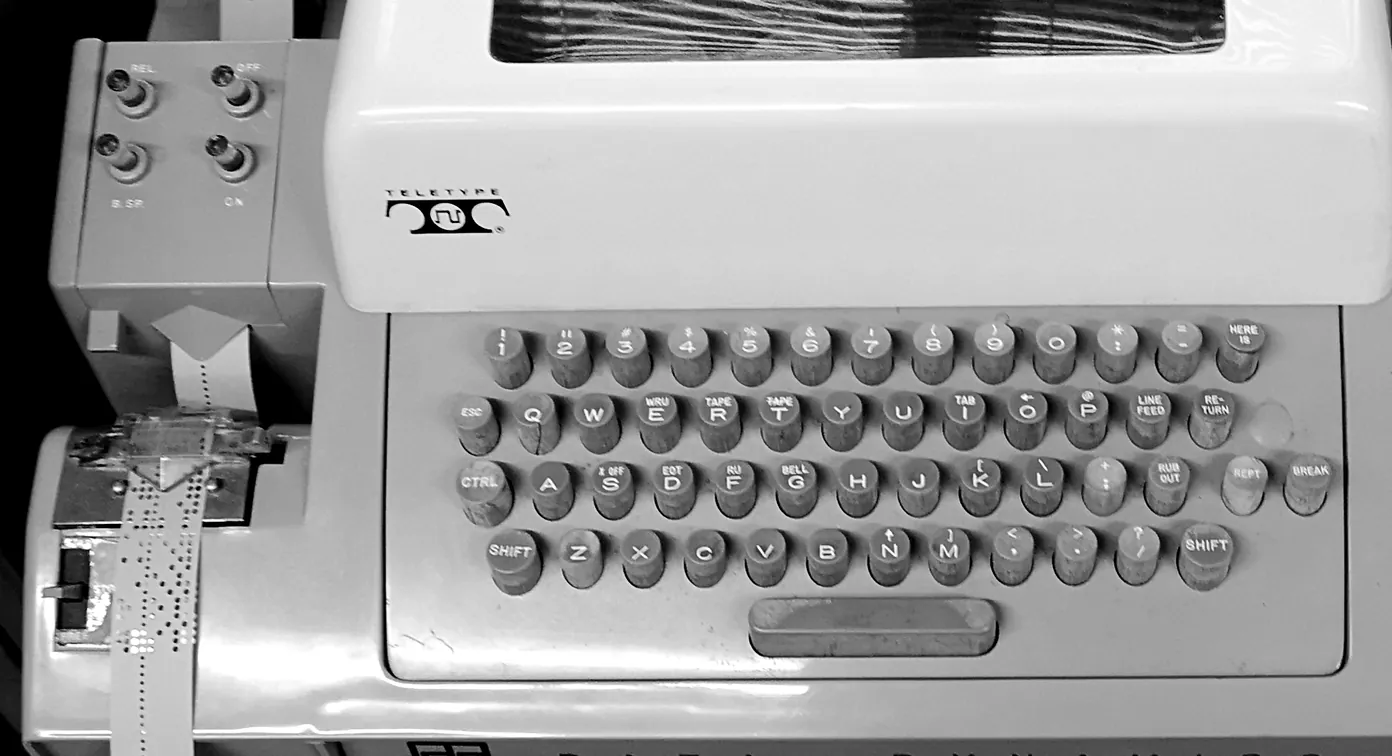
Whatever read the tape later, a computer or another Teletype, was expected to skip the rubbed-out rows. The ECMA-6 standard, Ecma International’s version of the same code, still says so: DEL characters “may be inserted into, or removed from, a data stream without affecting the information content of that stream.”
Why it landed at 127
The code’s two ends were settled early on. Charles Mackenzie, an IBM planner who worked with the ASCII committee from 1962, recounts in his history of character sets that while the code was still being planned, the American Telephone and Telegraph Company stated its official requirements: “There should be an all-zeros character, Null, and an all-ones character, Delete.”
Once the committee chose seven bits, the all-ones code had to be 127, the last position in the chart. The first edition, X3.4-1963, already put DEL there, at the foot of a last column that was otherwise mostly unassigned. When lowercase letters filled that column in the 1967 revision, DEL stayed where it was, as the one control code outside columns 0 and 1. The 1968 definitions, reprinted in RFC 20, give DEL’s job as erasing “erroneous or unwanted characters in perforated tape,” and admit the oddity: “In the strict sense, DEL is not a control character.”
Its odd position still shows up in caret notation, which writes a control code as ^ plus the character whose code differs from it only in the 0x40 bit. For the codes from 0 to 31, that’s a capital letter or a symbol, as in ^[ for ESC. For DEL, 0x7F minus 0x40 is 0x3F, the question mark, so DEL appears as ^?. The Ctrl+[ article explains how the Ctrl key uses the same bit.
From erase to interrupt and back
Once terminals were connected straight to computers, DEL needed a new job. Early Unix gave it one that had nothing to do with erasing. In the Seventh Edition manual from 1979, the # key erased the last character and @ erased the whole line. DEL “(Rubout) is not passed to a program but generates an interrupt signal,” which normally stopped the running program.
Today the interrupt key is Ctrl-C, and DEL has gone back to erasing. FreeBSD’s terminal defaults, for example, set the erase character (CERASE) to ^? and the interrupt (CINTR) to ^C. FreeBSD also accepts ^H as a second erase character, which is a quiet nod to the trouble described next.
Backspace or Delete?
ASCII also has a code for moving back one position, BS (backspace) at 8. On a printing terminal, BS only moved the print head back one space, so a program had to choose which of the two codes would mean “erase the last character.” DEC’s terminals made both available. On the VT100, the BACKSPACE key sent 010 (octal for BS) and the DELETE key sent 177 (DEL). On the later VT220, the <X] key “sends a DEL character.” A separate Remove key on the editing keypad sends ESC [ 3 ~, and BS comes from Ctrl-H.
PC keyboards brought both a Backspace key and a Delete key. Terminal emulators had to decide what those keys should send. Thomas Dickey, who maintains xterm, sums up the result: “we’ve accumulated three things that are being equated as ‘Delete,’” meaning BS, DEL and ESC [ 3 ~. Since xterm emulates DEC’s terminals, he says, the backarrow key at the upper right of the letter keys “should generate a 127 (often displayed as ^?).” Many terminal emulators follow the same convention, so the Backspace key on your keyboard often sends DEL.
Not everyone agreed, and some settings still show it. PuTTY’s manual describes both camps: “Some terminals believe that the Backspace key should send the same thing to the server as Control-H (ASCII code 8),” while others send 127. When a terminal and the system on the other end disagree, pressing Backspace prints ^H or ^? instead of erasing. The usual fix is to tell the terminal driver which code to expect with stty erase, or to change the terminal’s setting to match.
Still all ones
DEL was designed for a physical fact: a hole in paper can’t be filled back in. The tape is long gone, but the code hasn’t moved. It still sits at 127, at the end of the table, with every bit set, and pressing Backspace still sends it, more than sixty years after the 1963 standard put it there.
Continue reading
Sources
- American Standards Association, American Standard Code for Information Interchange, X3.4-1963, p. 5 (the 1963 code chart). — Vint Cerf, “ASCII format for Network Interchange,” RFC 20, October 1969, which reproduces the control definitions of USAS X3.4-1968. https://www.rfc-editor.org/rfc/rfc20 — and Ecma International, ECMA-6, 7-Bit Coded Character Set, 6th edition, December 1991, §6.5 “Character DELETE.” https://ecma-international.org/wp-content/uploads/ECMA-6_6th_edition_december_1991.pdf
- Charles E. Mackenzie, Coded Character Sets: History and Development, Addison-Wesley, 1980, §13.1 (p. 212) and §14.5. https://archive.org/details/codedcharacterse00unse
- Tom Jennings, “An annotated history of some character codes,” the sections on ITA2, FIELDATA (including NOTE 14, on FIELDATA as of 1958) and ASCII-1967 (the entry for DEL). https://www.sr-ix.com/Archive/CharCodeHist/index.html
- Digital Equipment Corporation, System User’s Guide, DEC-08-NGCB-D, May 1969, “ASR33 Teletype” (Figures INTRO-2 and INTRO-3, and “Paper Tape Punch”). http://www.pdp8online.com/pdp8cgi/query_docs/tifftopdf.pl/pdp8docs/dec-08-ngcb-d.pdf?pages=20-22
- Bell Laboratories, UNIX Time-Sharing System: UNIX Programmer’s Manual, Seventh Edition, 1979, tty(4). https://man.cat-v.org/unix_7th/4/tty — and FreeBSD, sys/sys/ttydefaults.h. https://github.com/freebsd/freebsd-src/blob/main/sys/sys/ttydefaults.h
- Digital Equipment Corporation, VT100 User Guide, Chapter 3, Table 3-4. https://vt100.net/docs/vt100-ug/chapter3.html — VT220 Programmer Reference Manual, Chapter 3, §3.2.1.2, §3.2.2 (Table 3-1) and §3.2.5 (Table 3-5). https://vt100.net/docs/vt220-rm/chapter3.html — Thomas E. Dickey, XTerm FAQ, “Why doesn’t my delete key work?” https://invisible-island.net/xterm/xterm.faq.html — and Simon Tatham, PuTTY User Manual, §4.4.1 “Changing the action of the Backspace key.” https://the.earth.li/~sgtatham/putty/0.83/htmldoc/Chapter4.html