History · Keyboards
Why Ctrl+[ is Escape
Ctrl clears the 0x40 bit, which turns [ (0x5B) into ESC (0x1B).
Ask a longtime Vim user how they leave insert mode and many will say Ctrl-[, not Esc. Vim’s own help recommends it: “If your
The reason is in the ASCII table. The opening bracket [ is 0x5B. ESC is 0x1B. The only difference between them is one bit, the one worth 0x40, and that bit is what the Ctrl key throws away.
| Key | Code | With Ctrl | Control code |
|---|---|---|---|
@ |
0x40 | 0x00 | NUL (null) |
H |
0x48 | 0x08 | BS (backspace) |
I |
0x49 | 0x09 | HT (horizontal tab) |
M |
0x4D | 0x0D | CR (carriage return) |
[ |
0x5B | 0x1B | ESC (escape) |
One bit, two columns
ASCII is laid out as a chart of eight columns with 16 rows each. Columns 0 and 1 hold the 32 control codes. Columns 4 and 5 hold @, the capital letters, and five more symbols: [ \ ] ^ _. Each control code sits in the same row as one of those characters, four columns to the left. Moving four columns left means subtracting 64, or 0x40.
Terminal makers built that into their keyboards. The manual for the Lear Siegler ADM-3A, a video terminal from the 1970s, prints the full code chart and labels the first two columns as control codes “generated by holding CTRL key while typing the corresponding key shown in columns 4 and 5.” Ctrl-G rings the bell, Ctrl-M is a carriage return, and Ctrl-[ is ESC, because [ shares a row with ESC.†
Lowercase letters work too. They sit 32 codes (0x20) above the capitals, and terminals drop that bit as well. In effect, Ctrl keeps only the low five bits of a key’s code, so Ctrl-a and Ctrl-A send the same code. The VT100’s manual says its Ctrl codes come out the same “shifted or unshifted.”
It wasn’t always Escape
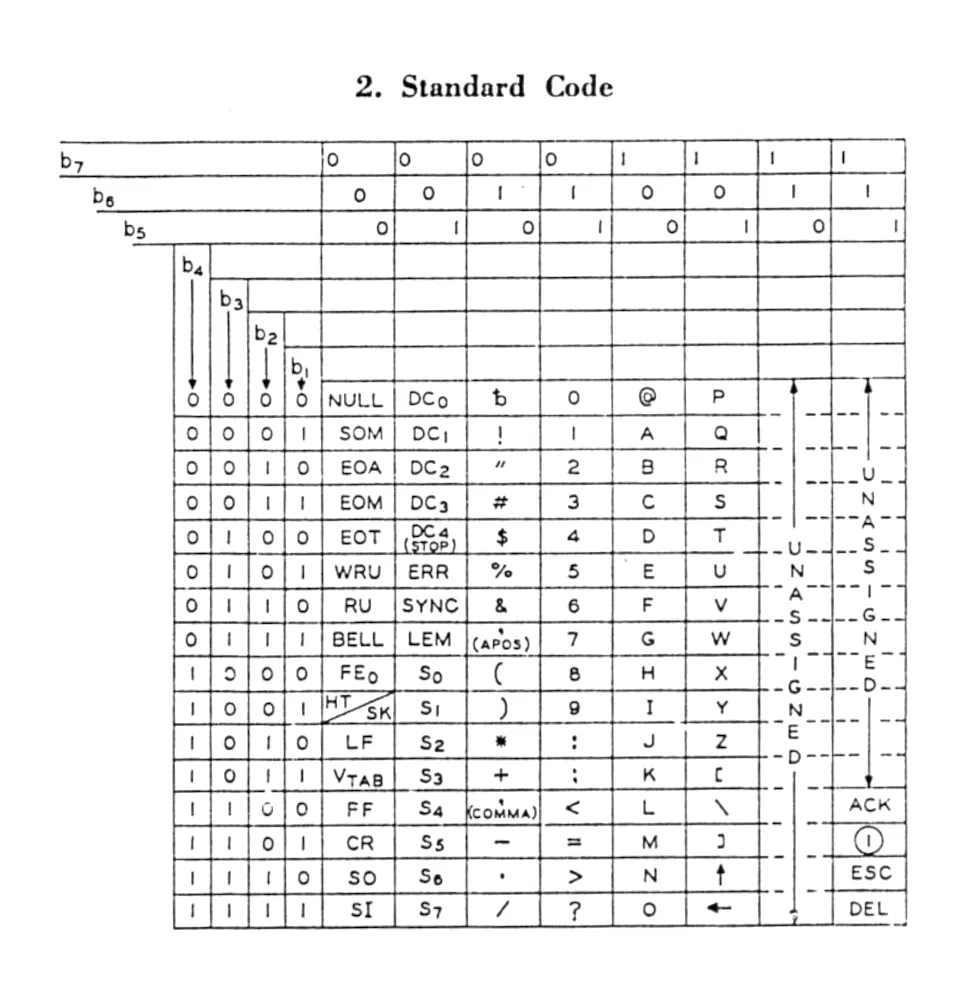
The pairing of [ and ESC wasn’t there from the start. In the first edition of ASCII, X3.4-1963, [ already sat at 0x5B, but the control slot in its row held a code called S3. ESC sat near the foot of the last column, at 7/14, the position ~ holds today, among a few codes in a part of the chart otherwise left unassigned. A terminal that followed the Ctrl rule on the 1963 chart would have produced S3 for Ctrl-[.
ESC moved in the 1967 revision (published as USAS X3.4-1968), which brought it and ACK, the other stray, down into the control columns. It landed at 1/11, 0x1B, in the same row as [.
Wired into the keyboard
DEC’s VT100 terminal followed the same rule. Its user guide lists the codes the keyboard sends with Ctrl held down: Space gives NUL, the letters give 1 through 26, and [ gives octal 033, ESC. The keyboard also had a separate ESC key that sent the same code.
Past the letters, terminals never fully agreed. On the VT100, Ctrl-? sends US (0x1F), but the mapping in common use today sends DEL (0x7F) for it, and also treats Ctrl-3 as Esc and Ctrl-2 as NUL. The documentation for the kitty terminal says the mapping “was historically dependent on the layout of hardware terminal keyboards and is not specified anywhere, completely,” and points to the VT100’s table as the best-known reference.
Why Vim users press Ctrl-[
Vi uses Escape to leave insert mode, and its keyboard history explains why some users still reach for Ctrl-[. Bill Joy wrote vi at Berkeley once the department got ADM-3A terminals that could place the cursor anywhere on the screen, as Kirk McKusick recounts in his history of Berkeley Unix. According to the ADM-3A’s manual, its keyboard had ESC immediately to the left of Q, where most keyboards now put Tab, and CTRL to the left of A, where Caps Lock is today.
Modern keyboards moved Esc to the far top-left corner, away from the home row. Ctrl-[ brings it back within reach of both hands, especially for people who remap Caps Lock to Ctrl. In a terminal both send 0x1B, so to Vim they are one key, and its help lists them in the same entry: “
Escape as a prefix
ESC was designed to change the meaning of whatever follows it, and terminals lean on that. When you press an arrow key on a VT100 in its usual mode, it sends ESC, [ and a letter. Many terminals also send Alt combinations as ESC followed by the key. In xterm this is the metaSendsEscape setting, which, when switched on, turns a key pressed with Meta into “a two-character sequence with the character itself preceded by ESC.”†
Emacs accepts the same thing by hand. Typing ESC and then a is the same as M-a (Meta-a), which the Emacs manual calls “useful on certain text terminals where the Meta key does not function reliably.”
This creates a timing problem. When a program receives ESC, it can’t know at once whether you pressed Esc or whether more bytes are on the way. So it waits a moment. Vim’s help says that with escape sequences turned off, “the single ttimeoutlen option, which Vim’s standard defaults file sets to 100 milliseconds. The terminal multiplexer tmux waited 500 milliseconds by default until version 3.5 cut its escape-time to 10.
Siblings that can’t be told apart
Escape isn’t the only key that shares a byte with a Ctrl combination. Tab is Ctrl-I, Enter is Ctrl-M, and on many systems Backspace is Ctrl-H. In a terminal, a program can’t bind Ctrl-I to one command and Tab to another, because both arrive as 0x09. The Emacs manual puts it plainly: “With an ordinary ASCII terminal, there is no way to distinguish between TAB and C-i (and likewise for other such pairs), because the terminal sends the same character in both cases.” Graphical programs don’t have this problem, since they see the keys themselves rather than the codes.
Terminals are now fixing it. The kitty keyboard protocol, created for the kitty terminal and since adopted by others including alacritty, foot, Ghostty, iTerm2 and WezTerm, lets a program ask for unambiguous key reports. The protocol’s documentation lists the old problems. Among them, a program can’t reliably tell a lone press of Esc from the start of an escape sequence, and programs have worked around it with “fragile timing related hacks.”
Once a program turns on the protocol’s “disambiguate” mode, Esc arrives as ESC [ 27 u, the number being ESC’s own code. Under the same rules, Ctrl-[ arrives as ESC [ 91;5u: 91 is the code for [, and 5 means Ctrl. They are finally two different keys. Both sequences still start with ESC.
Continue reading
Sources
- American Standards Association, American Standard Code for Information Interchange, X3.4-1963, p. 5 (the 1963 code chart). — Vint Cerf, “ASCII format for Network Interchange,” RFC 20, October 1969, which reproduces the code chart of USAS X3.4-1968. https://www.rfc-editor.org/rfc/rfc20 — and Tom Jennings, “An annotated history of some character codes,” the entry for ESC. https://www.sr-ix.com/Archive/CharCodeHist/index.html
- Lear Siegler, ADM-3A Operators Manual, DP104, May 1979, Figure 1-3 “ADM-3A Graphic Character Set and CTRL Codes” and Figure 3-1 “ADM-3A Standard Keyboard.” https://deramp.com/downloads/mfe_archive/030-Terminals/LearSiegler/ADM-3A/Lear%20Siegler%20ADM3A%20operators%20manual.pdf — and Marshall Kirk McKusick, “Twenty Years of Berkeley Unix,” in Open Sources, O’Reilly, 1999. https://www.oreilly.com/openbook/opensources/book/kirkmck.html
- Digital Equipment Corporation, VT100 User Guide, Chapter 3, Table 3-5 “Control Codes Generated.” https://vt100.net/docs/vt100-ug/chapter3.html
- Vim help, “insert.txt” (i_CTRL-[) and “options.txt” (esckeys, ttimeoutlen). https://vimhelp.org/insert.txt.html and https://vimhelp.org/options.txt.html — and tmux, CHANGES (“Reduce default escape-time to 10 milliseconds,” tmux 3.5). https://github.com/tmux/tmux/blob/master/CHANGES — with the earlier 500 ms default in options-table.c at tmux 3.4. https://github.com/tmux/tmux/blob/3.4/options-table.c
- GNU Emacs Manual, “Kinds of User Input” and “Named ASCII Control Characters.” https://www.gnu.org/software/emacs/manual/html_node/emacs/User-Input.html and https://www.gnu.org/software/emacs/manual/html_node/emacs/Named-ASCII-Chars.html — and Thomas E. Dickey, xterm manual page, the metaSendsEscape resource. https://invisible-island.net/xterm/manpage/xterm.html
- Kovid Goyal, “Comprehensive keyboard handling in terminals,” kitty documentation. https://sw.kovidgoyal.net/kitty/keyboard-protocol/